Its so Boring in the house... pfffffffffft.........
Miyerkules, Hulyo 27, 2011

Martes, Hulyo 26, 2011
Types of Computers
1.) Analog Computers: These are almost extinct today. These are different from a digital computer because an analog computer can perform several mathematical operations simultaneously. It uses continuous variables for mathematical operations and utilizes mechanical or electrical energy.

2.) Hybrid Computers: These computers are a combination of both digital and analog computers. In this type of computers, the digital segments perform process control by conversion of analog signals to digital ones.

3.) Mainframe Computers: Large organizations use mainframes for highly critical applications such as bulk data processing and ERP. Most of the mainframe computers have the capacities to host multiple operating systems and operate as a number of virtual machines and can thus substitute for several small servers.
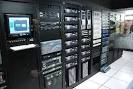
4.) Microcomputers: A computer with a microprocessor and its central processing unit is known as a microcomputer. They do not occupy space as much as mainframes. When supplemented with a keyboard and a mouse, microcomputers can be called as personal computers. A monitor, a keyboard and other similar input output devices, computer memory in the form of RAM and a power supply unit come packaged in a microcomputer. These computers can fit on desks or tables and serve as the best choices for single-user tasks.
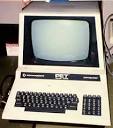
5.) Desktops: A desktop is intended to be used on a single location. The spare parts of a desktop computer are readily available at relative lower costs. Power consumption is not as critical as that in laptops. Desktops are widely popular for daily use in workplaces and households.
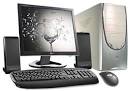
6.) Laptops: Similar in operation to desktops, laptop computers are miniaturized and optimized for mobile use. Laptops run on a single battery or an external adapter that charges the computer batteries. They are enabled with an inbuilt keyboard, touch pad acting as a mouse and a liquid crystal display. Its portability and capacity to operate on battery power have served as a boon for mobile users.

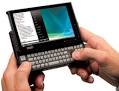
7.) Personal Digital Assistants (PDAs): It is a handheld computer and popularly known as a palmtop. It has a touch screen and a memory card for storage of data. PDAs can also be effectively used as portable audio players, web browsers and smart phones. Most of them can access the Internet by means of Bluetooth or Wi-Fi communication.
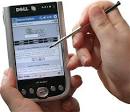
8.) Minicomputers: In terms of size and processing capacity, minicomputers lie in between mainframes and microcomputers. Minicomputers are also called mid-range systems or workstations. The term began to be popularly used in the 1960s to refer to relatively smaller third generation computers. They took up the space that would be needed for a refrigerator or two and used transistor and core memory technologies. The 12-bit PDP-8 minicomputer of the Digital Equipment Corporation was the first successful minicomputer.
2.) Hybrid Computers: These computers are a combination of both digital and analog computers. In this type of computers, the digital segments perform process control by conversion of analog signals to digital ones.
3.) Mainframe Computers: Large organizations use mainframes for highly critical applications such as bulk data processing and ERP. Most of the mainframe computers have the capacities to host multiple operating systems and operate as a number of virtual machines and can thus substitute for several small servers.
4.) Microcomputers: A computer with a microprocessor and its central processing unit is known as a microcomputer. They do not occupy space as much as mainframes. When supplemented with a keyboard and a mouse, microcomputers can be called as personal computers. A monitor, a keyboard and other similar input output devices, computer memory in the form of RAM and a power supply unit come packaged in a microcomputer. These computers can fit on desks or tables and serve as the best choices for single-user tasks.
5.) Desktops: A desktop is intended to be used on a single location. The spare parts of a desktop computer are readily available at relative lower costs. Power consumption is not as critical as that in laptops. Desktops are widely popular for daily use in workplaces and households.
6.) Laptops: Similar in operation to desktops, laptop computers are miniaturized and optimized for mobile use. Laptops run on a single battery or an external adapter that charges the computer batteries. They are enabled with an inbuilt keyboard, touch pad acting as a mouse and a liquid crystal display. Its portability and capacity to operate on battery power have served as a boon for mobile users.
7.) Personal Digital Assistants (PDAs): It is a handheld computer and popularly known as a palmtop. It has a touch screen and a memory card for storage of data. PDAs can also be effectively used as portable audio players, web browsers and smart phones. Most of them can access the Internet by means of Bluetooth or Wi-Fi communication.
8.) Minicomputers: In terms of size and processing capacity, minicomputers lie in between mainframes and microcomputers. Minicomputers are also called mid-range systems or workstations. The term began to be popularly used in the 1960s to refer to relatively smaller third generation computers. They took up the space that would be needed for a refrigerator or two and used transistor and core memory technologies. The 12-bit PDP-8 minicomputer of the Digital Equipment Corporation was the first successful minicomputer.
History of Computers
The history of computers starts out about 2000 years ago, at the birth of the abacus, a wooden rack holding two horizontal wires with beads strung on them. When these beads are moved around, according toprogramming rules memorized by the user, all regular arithmetic problems can be done. Another important invention around the same time was the Astrolabe, used for navigation. Blaise Pascal is usually credited for building the first digital computer in 1642. It added numbers entered with dials and was made to help his father, a tax collector. In 1671, Gottfried Wilhelm von Leibniz invented a computer that was built in 1694. It could add, and, after changing some things around, multiply. Leibniz invented a special stepped gear mechanism for introducing the addend digits, and this is still being used. The prototypes made by Pascal and Leibniz were not used in many places, and considered weird until a little more than a century later, when Thomas of Colmar (A.K.A. Charles Xavier Thomas) created the first successful mechanical calculator that could add, subtract, multiply, and divide. A lot of improved desktop calculators by many inventors followed, so that by about 1890, the range of improvements included:
- Accumulation of partial results
- Storage and automatic reentry of past results (A memory function)
- Printing of the results
Each of these required manual installation. These improvements were mainly made for commercial users, and not for the needs of science.
Miyerkules, Hulyo 20, 2011
Martes, Hulyo 19, 2011
Mag-subscribe sa:
Mga Komento (Atom)